
You want Indeed job data, so you started building a scraper.
It worked on Tuesday. By Friday it returned empty results, and you have no idea why.
Here is the honest version. You can scrape Indeed by requesting search pages, parsing the HTML, and following pagination, and I will show you how. But scrapers break every time Indeed changes its layout or tightens its anti-bot checks, so for anything ongoing, a managed Indeed API is the better call. This guide covers both, so you can pick with your eyes open.
How does an Indeed scraper work?
An Indeed scraper works in four steps: fetch a search page, parse the HTML for job cards, follow the pagination links, and store the fields you want. Each job card holds a title, a company, a location, and a link to the full posting. The scraper repeats this across pages until it has enough roles. Every step depends on the page staying exactly as it is today.
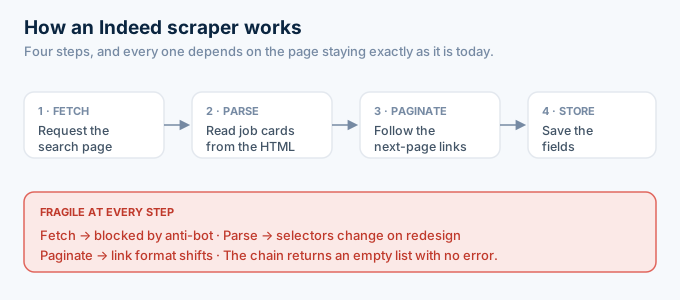
That last sentence is the whole problem in miniature.
A scraper is not reading data. It is reading a web page and guessing which parts are data. When the page moves, the guess is wrong.
An API is the opposite. It hands you the data directly, so there is nothing to guess and nothing to break when the page changes. That single difference is the whole case for using one.
How do you build an Indeed scraper in Python?
You build a basic Indeed scraper in Python with a request library and an HTML parser. You fetch the search URL for your keyword and location, parse the response with BeautifulSoup, pull the fields out of each job card, and loop through pages. It is maybe forty lines. The catch is that this simple version gets blocked fast, because Indeed sees one script hitting it from one address.
Here is the shape of it.
import requestsfrom bs4 import BeautifulSoup
def scrape_indeed(query, location, pages=1):    roles = []    for p in range(pages):        url = "https://www.indeed.com/jobs"        params = {"q": query, "l": location, "start": p * 10}        html = requests.get(url, params=params, headers={"User-Agent": "Mozilla/5.0"}).text        soup = BeautifulSoup(html, "html.parser")        for card in soup.select("div.job_seen_beacon"):            roles.append({                "title": card.select_one("h2.jobTitle").get_text(strip=True),                "company": card.select_one("[data-testid='company-name']").get_text(strip=True),                "location": card.select_one("[data-testid='text-location']").get_text(strip=True),            })    return roles
Run that once and it might work. Run it a hundred times and you get blocked.
The selectors above, like div.job_seen_beacon, are the fragile part. Indeed can rename that class in any release, and your scraper returns an empty list with no error to tell you why.
To go further you add a headless browser to render JavaScript, rotate proxies to avoid blocks, and solve captchas when they appear. That is where a weekend project turns into a system you maintain.
Each addition brings its own upkeep.
The headless browser needs updating when the render changes. The proxy pool needs topping up when addresses get flagged. The captcha solver needs swapping when the challenge type changes.
You started writing a parser and ended up running infrastructure.
How do you avoid getting blocked while scraping Indeed?
You avoid blocks by looking less like a bot: slow your request rate, rotate residential proxies, vary your user agent, and render with a headless browser so pages load like a real visit. None of it is a permanent fix. Anti-bot systems adapt, so every technique buys you time rather than a solution.
Start with delays. Hammering the site from one address is the fastest way to get blocked, so you add pauses between requests.
Then proxies. Residential proxies route your traffic through many addresses, so no single one looks busy.
Then a real browser. A headless browser runs JavaScript and looks more human than a bare request.
Each layer helps, and each layer is one more thing to run.
The uncomfortable truth is that you are in an arms race with a company that has more engineers than you. You can win a round. You will not win the war.
That is not a knock on your skills. It is a mismatch of resources. Indeed employs people whose whole job is stopping automated traffic, and for you it is a side task.
What methods can you use to scrape Indeed?
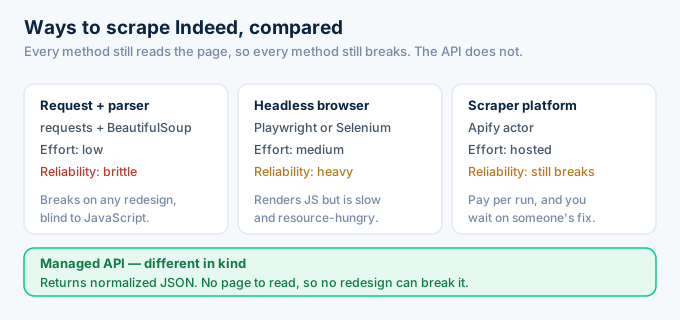
There are three common methods, and they trade effort against reliability. A request library with an HTML parser is the simplest and the most fragile. A headless browser like Playwright renders the full page and handles JavaScript, but is slower and heavier. A scraper platform such as an Apify actor hosts the whole thing for you, at a cost per run and still subject to breakage.
Notice what none of these change.
Every method still reads the page, so every method still breaks when the page moves. You are choosing how much work to do before the next redesign, not whether the next redesign hurts.
A managed API is the fourth option, and it is different in kind. It does not read the page at all.
What data can you pull from an Indeed scrape?
A search scrape gives you the summary fields on each card: title, company, location, and a link to the posting. To get salary, the full description, or benefits, you fetch each posting page and parse that too. That second layer doubles your requests and your breakage surface, because now two different page structures can change on you.
Search pages and detail pages are different templates.
The search page lists cards. The detail page holds the long description, the benefits, and often the salary.
So a real scrape is two scrapers. One for the list, and one for each posting.
That is twice the selectors to maintain and twice the chances to break. An API collapses it: you search, then fetch detail by job key, and both return the same clean object.
There is a subtle trap in the job key too. A scraper reads it out of the posting URL, so a change to that URL format quietly breaks your links. With an API, the job key is a field, not a substring you parse out of a link.
Why do Indeed scrapers keep breaking?
Indeed scrapers break because they depend on things you do not control. The page structure changes with every redesign, and your selectors stop matching. Anti-bot systems detect automated traffic and block your IP. Captchas appear when you look suspicious. JavaScript-rendered content is invisible to a simple request. Rate limits throttle you the moment you move fast.
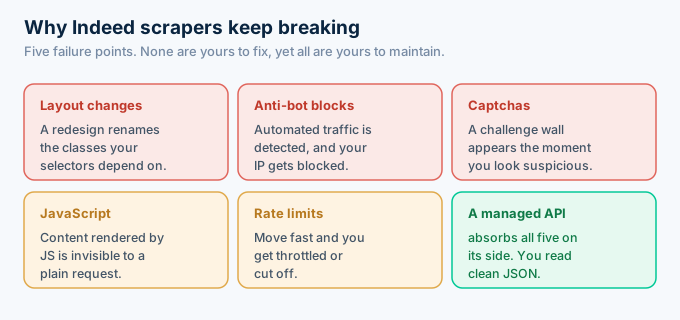
This is why scraping feels like whack-a-mole.
You fix the selector, and two weeks later the proxies get flagged. You buy better proxies, and a captcha wall goes up. The work never ends, because the other side keeps moving.
None of these problems are yours to solve, yet all of them are yours to maintain.
And you find out at the worst time. A scraper fails quietly. It returns an empty list, not an error, so you often learn it broke when a user asks where the jobs went.
Is it legal to scrape Indeed?
Scraping Indeed sits in a gray area, and the safe reading is to avoid it. Indeed discourages unauthorized scraping in its terms, and it enforces that with active anti-bot systems. Public data carries some legal nuance, but the terms are clear and the risk is real. Reading the same postings through a compliant third-party Indeed API is the lower-risk path.
I am not a lawyer, and this is not legal advice.
What I can say is practical. The companies that scrape at scale spend real effort on compliance review, and most small teams do not have that budget.
A managed API moves that risk. The provider returns normalized public postings under its own terms, so you are not the one hammering the site.
There is a reputational angle too. Aggressive scraping can get your IP ranges blocked and your project flagged, which is a bad look when you are building a business. A compliant API keeps you on the right side of that line.
How much does scraping Indeed really cost?
Scraping Indeed costs more than zero, even though there is no invoice. You pay for residential proxies, the compute to run headless browsers, retries on failed pages, and the engineer hours spent fixing breakage. For most teams the proxy bill alone passes the price of a managed API before you count a single hour of maintenance.
The code is free. Everything around it is not.
Residential proxies are billed by traffic, and a real scrape uses a lot of it. Headless browsers are heavy, so the compute costs more than a plain request.
Then there is the hidden line. The engineer who loses a day to a broken selector is not shipping the feature your users asked for.
Price that day honestly. It usually costs more than a year of API credits, which run 5 dollars a month for 1,000 answers.
Run the number for your own case. Add up a month of proxies, then set it next to 5 dollars. The comparison tends to end the debate.
Can you scrape Indeed at scale?
Scraping Indeed at scale is possible, but it gets expensive and fragile fast. The more you pull, the more proxies you burn and the more attention you draw, so blocks come sooner. Teams that need real volume almost always move to an API, because a managed provider already runs the sourcing infrastructure that scale demands.
Small scrapes fly under the radar. Big ones do not.
The moment you pull thousands of roles a day, your traffic pattern stands out, and the defenses tighten.
You answer with more proxies and more infrastructure, which is exactly the business a data API is already in. At scale, you are not saving money by scraping. You are rebuilding a worse version of the thing you could have bought.
That realization usually arrives after the second or third proxy upgrade. The cheaper lesson is to see it coming, before you have sunk a quarter into infrastructure that a single endpoint replaces.
Indeed scraper vs Indeed API: which should you use?
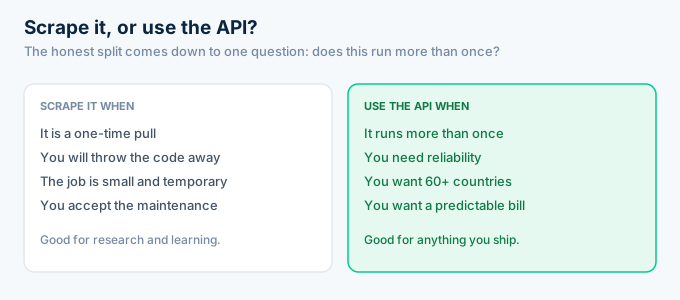
Use a scraper only for a one-time research pull you will throw away. Use an Indeed API for anything that runs more than once. The scraper wins when the job is small, temporary, and you accept the maintenance. The API wins on reliability, coverage, and total cost, because it returns normalized JSON with no proxies, no captchas, and nothing to fix when Indeed changes.
Here is the same comparison in full.
| DIY scraper | Indeed API | |
|---|---|---|
| Data shape | Raw HTML you parse | Normalized JSON |
| Maintenance | Constant | None |
| Proxies and captchas | Your problem | Handled |
| Country coverage | Build each one | 60+ built in |
| Cost | Proxies plus engineer time | $5 / month, 1,000 answers |
| Best for | One-time research | Anything ongoing |
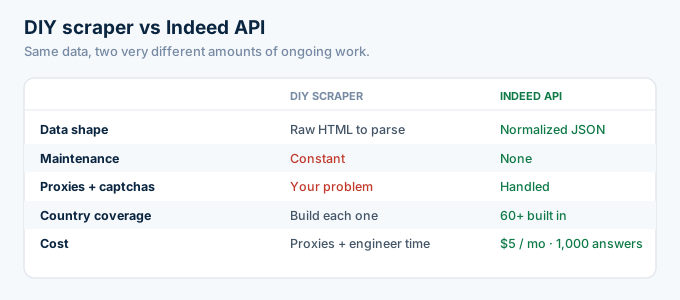
The cost line is the one people misjudge.
A scraper looks free because the code is free. Then you add proxies, compute, and the engineer hours spent fixing it, and the API was cheaper the whole time.
Coverage is the other quiet gap. A scraper you built for the US Indeed site does not read the UK or German editions without new work. An API hands you all 60-plus from one parameter.
That difference compounds. Every country you want is a new scraper to build and maintain, or a country code you already have.
How do you switch from a scraper to an Indeed API?
You switch by replacing the fetch-and-parse step with a single authenticated call. Instead of downloading a search page and scraping it, you POST your keyword and location to the search endpoint and read a normalized role object. Your storage and display code does not change, because the data comes back in a consistent shape. Most migrations take an afternoon.
Here is the same scrape as one API call.
import requests
def search_indeed(query, location, key):    r = requests.post(        "https://api.rolesapi.com/v1/search",        headers={"Authorization": f"Bearer {key}"},        json={"query": query, "location": location, "country": "us"},    )    return r.json()["data"]
No parser. No proxies. No selectors to break next month.
That function returns the same fields your scraper was after, already clean, across 60+ country editions. When Indeed redesigns its site, this code does not notice.
That is the payoff of the migration. You trade a system you babysit for a call you forget about.
And you keep the parts that were actually yours. The storage, the ranking, and the product stay untouched, because only the data source changed.
Frequently asked questions
How do I scrape Indeed jobs?
You send a request to an Indeed search page, parse the HTML for job cards, follow pagination, and store the fields you need. In practice you also need proxies and a headless browser to get past anti-bot checks. It works until Indeed changes its layout, which is why many teams use an Indeed API instead.
Is it legal to scrape Indeed?
Indeed’s terms discourage unauthorized scraping, and its anti-bot systems actively block it. Public data has some legal nuance, but the risk is real and the terms are clear. Reading the same postings through a compliant third-party Indeed API is the safer path. RolesAPI is independent and returns normalized public postings.
Why does my Indeed scraper keep breaking?
Scrapers break because they depend on the page structure. When Indeed ships a redesign, your selectors stop matching. Anti-bot systems also rotate defenses, so proxies get blocked and captchas appear. A managed API absorbs all of that on its side, so your integration keeps working without maintenance.
What is the best way to scrape Indeed in 2026?
For a one-time research pull, a Python scraper or an Apify actor works. For anything ongoing, a managed Indeed API is the better call, because it returns normalized JSON with no proxies or breakage to maintain. RolesAPI covers 60+ country editions and starts free with 100 credits.
Do I need proxies to scrape Indeed?
Usually yes. A plain script from one IP gets rate-limited and blocked quickly, so scrapers rotate residential proxies to look like many users. Proxies cost money and add complexity. An Indeed API removes the need entirely, because the provider handles sourcing and you just read the response.
How do I switch from an Indeed scraper to an API?
You replace the fetch-and-parse step with one authenticated request. Instead of downloading and scraping HTML, you call the search endpoint, then read a normalized role object. Your storage and display code stays the same, because the data comes back in a consistent JSON shape. Most migrations take an afternoon.
Stop maintaining a scraper
Build the scraper if you want to learn how it works. It is a good exercise, and you will understand job data better for having done it.
But if you are shipping a product, your time is worth more than a proxy pool. The data was never the hard part. The upkeep was.
I have never met a team that regretted deleting a scraper. I have met plenty that regretted building one.
Create a free RolesAPI key, send the search call above, and get the same Indeed data with nothing to maintain. You get 100 credits and no card. For the full picture, read the complete Indeed API guide, the endpoint documentation, or the pricing breakdown.