
You searched for Indeed API pricing and found no price.
That is not you missing a page. Indeed does not sell public API access, so there is no pricing table to find.
Here is what you are really asking. What does it cost to get Indeed job data through an API in 2026? The answer comes from third-party providers, and the range is wide: free tiers, credit models at about half a cent per call, and enterprise contracts with real minimums. RolesAPI sits at the low end, free to start and 5 dollars a month after.
This post shows the actual numbers, the math on real workloads, and where scraping stops being cheaper.
Does Indeed charge for API access?
Indeed does not charge you, because it does not sell you API access. The public Publisher and Job Search APIs were retired, so there is no developer plan, no price, and no signup. What remains at Indeed is employer-side: applicant-tracking integrations and sponsored job spend. Neither of those gives you a feed of postings to build on.
That is why the search results feel broken.
You find old pages listing an Indeed API, follow them, and land on a form that no longer works. The program behind the price is gone.
Sponsored job spend is a different product entirely. That is Indeed charging employers to promote listings, not Indeed selling you a data feed.
The ATS route is closed for the same reason. It exists so employers can post jobs in, not so developers can read jobs out.
So the honest framing is this. You are not shopping for Indeed’s price. You are shopping for a job-data provider’s price.
What does an Indeed API actually cost in 2026?
Third-party pricing splits into three models. Usage-based credits charge per answer, and start free. Flat subscriptions charge a monthly fee with a cap. Enterprise data contracts charge a large annual minimum and come with a sales call. For normalized Indeed postings, the credit model is almost always cheapest, because you pay only for the roles you actually pull.
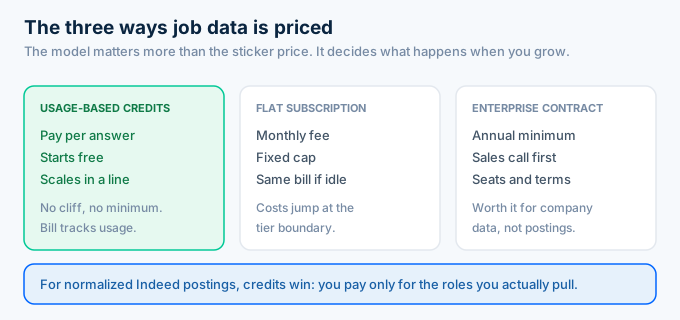
The model matters more than the sticker price.
A cheap subscription with a low cap gets expensive the moment you exceed it. A credit model scales in a straight line, so your bill tracks your usage instead of jumping at a tier boundary.
Enterprise contracts make sense when you need company and employee data at scale. For job postings, they are overkill.
Credits also handle spiky work better. If you pull hard in January and barely touch it in February, a subscription charges you the same both months while credits do not.
How does credit-based pricing work?
One credit buys one answer. Fetching a role costs a credit, and each result returned by a search costs a credit. RolesAPI gives you 100 credits free with no card, then 1,000 credits for 5 dollars a month, or 12,000 for 54 dollars a year. That is roughly half a cent per answer, and the price per credit drops on the annual plan.
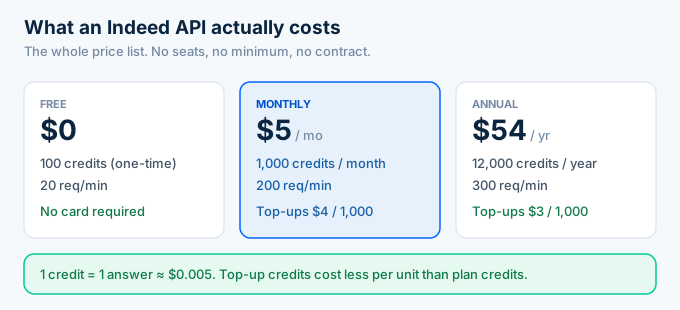
The free tier is not a demo. It covers every endpoint, so you can test search, role detail, salary, company, and batch before you pay anything.
Run out mid-month? You top up rather than jump a tier. Top-ups are 4 dollars per 1,000 credits on the monthly plan and 3 dollars per 1,000 on annual.
There is a detail worth catching. Top-up credits are cheaper per unit than plan credits, so scaling up does not punish you.
What can you actually do with 100 free credits?
One hundred free credits buys 100 answers. That is 100 role fetches, or two searches that each return 50 roles, or a single batch job of 100 keys. It is enough to test every endpoint, prove the data shape against your product, and measure your real credit burn before you pay anything.
Spend them deliberately. Pull one role first and read the object, then run a narrow search and count what comes back.
That second step teaches you your burn rate. A search returning 50 roles costs 50 credits, and that is the number your monthly bill scales from.
Do not spend the free tier on a wide crawl. You will burn it in two calls and learn nothing.
By the time the 100 credits are gone, you should know exactly which plan you need.
Which plan should you pick?
Pick free if you are still evaluating, monthly if you are in production under 1,000 answers a month, and annual if you know the pulling will continue. Free covers every endpoint with 100 credits and no card. Monthly at 5 dollars fits most small products. Annual at 54 dollars saves about 10 percent and raises your rate limit to 300 requests a minute.
Start free every time. There is no card, and you learn your real credit burn before you commit a dollar.
Move to monthly when a feature ships. 1,000 credits covers most small products, and a top-up handles a busy month without a plan change.
Go annual when the workload is steady. You get 12,000 credits, a lower rate per credit, and the highest rate limit.
Do not over-buy. The plans are small enough that guessing wrong costs you a few dollars, not a quarter of your budget.
Switching later is painless. The API surface is identical on every plan, so moving from free to annual changes your limits and your balance, not your code.
What are the rate limits on each plan?
Rate limits scale with the plan: 20 requests a minute on free, 200 on monthly, and 300 on annual. The limit controls how fast you can call. Credits control how much you can pull in total. They are separate meters, and you can hit either one first.
That distinction trips people up. You can have 11,000 credits left and still get a 429, because you fired too fast.
Handle it the boring way. Retry on 429 with exponential backoff and the job finishes anyway.
If you are pulling in bulk, do not race the limit. Post the keys to the batch endpoint and let it run async instead.
What does a real workload cost?
Most workloads land between 5 and 15 dollars a month. A niche job board pulling 500 new roles and refreshing each once burns 1,000 answers, which is exactly the 5 dollar plan. A salary dashboard doing 2,000 pay lookups a month runs about 9 dollars with one top-up. A one-time market pull of 10,000 roles fits inside the 54 dollar annual plan with credits to spare.
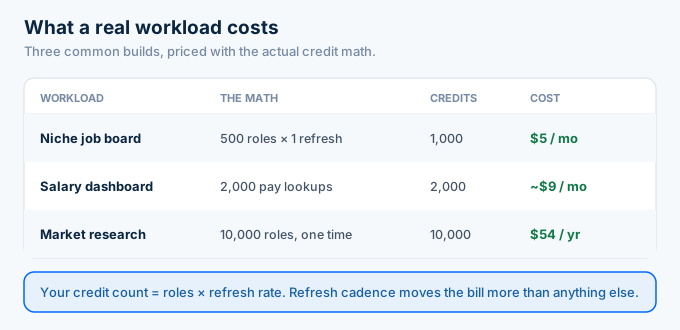
Work out your own number in one line. Count the roles you pull, multiply by how often you refresh them, and that is your credit count.
An AI agent answering job questions costs less than people expect. A few hundred queries a month is a few hundred credits, which sits inside the free tier while you test and inside the 5 dollar plan once it is real.
Refresh rate is the lever people forget. Pulling 500 roles once a month costs 500 credits. Refreshing those same roles daily costs 15,000.
Decide how fresh your product actually needs to be before you decide what plan you need.
How does RolesAPI pricing compare to alternatives?
RolesAPI is the cheapest way in for normalized Indeed postings. It starts free and costs 5 dollars a month. Coresignal sells company and employee data to enterprise buyers with contract minimums. Theirstack sits mid-market with hiring signals. Apify bills per scraper run. A do-it-yourself scraper has no sticker price and the highest real cost.
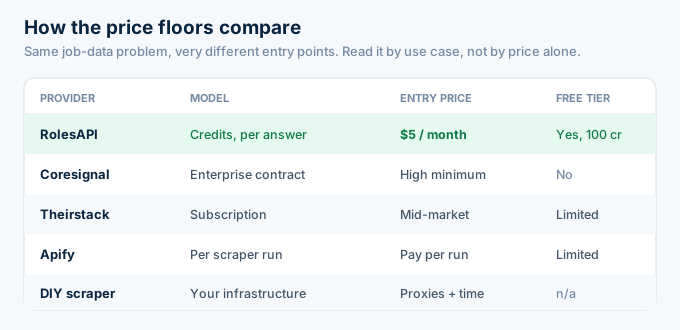
Here is the same call in a table.
| Provider | Model | Entry price | Free tier | Best for |
|---|---|---|---|---|
| RolesAPI | Credits, per answer | $5 / month | Yes, 100 credits | Indeed postings |
| Coresignal | Enterprise contract | High minimum | No | Company + employee data |
| Theirstack | Subscription | Mid-market | Limited | Hiring signals for GTM |
| Apify | Per scraper run | Pay per run | Limited | One-off scraping |
| DIY scraper | Your infrastructure | Proxies + time | n/a | Learning projects |
Read that table by use case, not by price alone.
If you need firmographics and headcount history, Coresignal earns its cost. If you need job postings, you are paying enterprise money for a job a 5 dollar plan does.
Apify is the interesting middle. Per-run billing looks cheap until a run fails and you pay for the retry, or the actor breaks and you wait for someone else to fix it.
The question is not who is cheapest on paper. It is who is cheapest for the data you actually need, once failures are priced in.
Is scraping Indeed cheaper than paying for an Indeed API?
Almost never. A scraper has no invoice, which is why it feels free. Then you pay for residential proxies to avoid blocks, compute to run it, retries when pages fail, and engineer hours every time Indeed ships a redesign. Against a credit model where 1,000 answers costs 5 dollars, the proxy line alone usually loses.
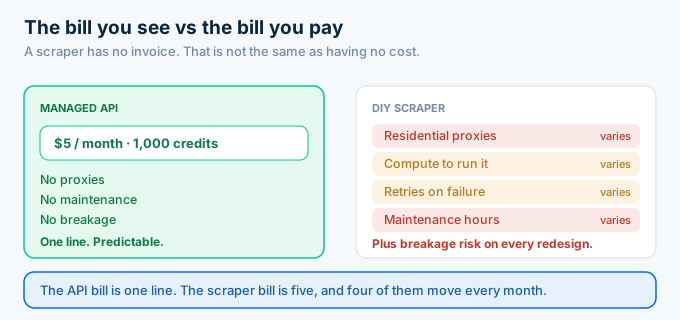
The expensive part never shows up in a budget.
It is the engineer who spends a Tuesday fixing selectors instead of shipping the feature your users asked for. That hour costs more than a month of credits.
I have watched teams build a scraper to save 5 dollars and spend a week a quarter keeping it alive. The data was never the hard part.
Price your own time honestly. If one hour of your week goes to scraper upkeep, the API was already cheaper from the first month you shipped it.
That is the calculation most teams run too late.
Scraping does win in one case. If you need a one-time pull for research and will throw the code away, the cost of a managed API is not worth the signup.
Are there hidden costs?
No. There are no per-seat fees, no contract, no minimum, and no charge for a failed request. You pay for answers. If you run out, calls return a clear out-of-credits error rather than billing you into an overage you never approved, and top-ups cost less per credit than the base plan.
This matters more than the headline price.
Enterprise data contracts often bundle seats, minimums, and an annual commitment. You sign before you know whether the data fits your product.
Here the worst case is a clear error and a 4 dollar top-up.
You also do not pay for mistakes. A 401 or a 429 costs no credit, because you did not get an answer.
People ask about the free tier expiring. It does not. The 100 credits are yours until you spend them, so you can evaluate on your own timeline instead of racing a 14 day trial window.
How do you cut your Indeed API bill?
You cut it by not paying for answers you will not use. Cache role detail so a repeat view costs nothing. Call a sub-resource like /salary when you only need pay data instead of the full role. Use field projection to trim payloads. Batch large pulls rather than looping single calls. Then watch the /v1/usage endpoint so spend never surprises you.
Caching is the biggest win by a distance. Postings do not change often, so store them and serve repeats from your own cache.
Refresh cadence is the second. Weekly instead of daily cuts your credit count by seven.
Sub-resources are the third. A salary widget that calls /salary moves less data and costs the same single credit as the full role, but keeps your app faster.
One more lever hides in search. Every result you get back costs a credit, so a broad query that returns 50 roles when you needed 5 burns 45 credits you will never look at.
Tighten the query. Narrow keywords and a real location beat casting a wide net and filtering in your own code.
None of this is premature optimization. On a credit model, these habits are the difference between a 5 dollar month and a top-up.
Frequently asked questions
How much does the Indeed API cost?
Indeed sells no public API, so it has no list price. What you actually pay comes from a third-party job-data API. RolesAPI starts free with 100 credits, then costs 5 dollars a month for 1,000 credits or 54 dollars a year for 12,000. One credit equals one answer, which works out to about half a cent per call.
Is there a free Indeed API?
There is no free official Indeed API, because the public program closed. The closest thing is a free tier on a third-party API. RolesAPI gives every new account 100 credits with no card required, which is enough to test search, role detail, salary, and batch before you decide whether to pay anything.
What is a credit on the Indeed API?
A credit is one answer. Fetching one role costs one credit, and each result in a search costs one credit. At 5 dollars for 1,000 credits, that is about half a cent per answer. Caching, field projection, and sub-resource endpoints all reduce how many credits a given feature burns.
Is scraping Indeed cheaper than paying for an API?
Usually not. A scraper looks free because the code is free, but you pay for proxies, retries, and the engineer hours spent fixing it every time Indeed changes its layout. On a credit model, 1,000 answers costs 5 dollars. Most teams spend more than that on proxies alone.
How does RolesAPI pricing compare to Coresignal or Theirstack?
RolesAPI is the low end on purpose: free to start, then 5 dollars a month. Coresignal targets enterprise buyers with contract minimums, and Theirstack sits in the mid-market with hiring-signal data. If you only need normalized Indeed postings, you are paying far less for the same job.
What happens when I run out of credits?
Calls return a clear out-of-credits error instead of silently failing, so nothing breaks quietly. You then top up or upgrade. Top-ups cost 4 dollars per 1,000 credits on the monthly plan and 3 dollars per 1,000 on annual. You can watch your balance any time on the /v1/usage endpoint.
Price your own workload today
Stop hunting for a price list that does not exist. Indeed has no public API, and the real question is what a provider charges to hand you the same data.
Count your roles, multiply by your refresh rate, and check that number against the 1,000 credits in the 5 dollar plan. Most builds land inside it.
If the number comes out bigger, the annual plan or a top-up covers it without a call with sales.
That is the point of a credit model. The price moves with your usage, and you can predict it on a napkin instead of a spreadsheet. No minimum, no seats, and no commitment you regret in month three.
Then create a free RolesAPI key and spend 100 credits proving it against your own workload before you pay anything. For the full picture, read the complete Indeed API guide, or go straight to the endpoint documentation.