
You found the Indeed API documentation. It is from 2019, half the links 404, and the signup button goes nowhere.
That is the problem with searching for Indeed API docs today. Indeed retired its developer program, so the official reference is a museum piece.
Here is what actually works. To read Indeed job data now, you follow the documentation for a third-party Indeed API. This guide is that reference for RolesAPI: authentication, every endpoint, the response shape, error codes, rate limits, and code you can paste and run. You can test all of it on a free tier of 100 credits with no card.
I will keep it practical. Every section answers a question a developer actually types into a search bar, and every code block runs as written once you drop in your key.
No archived screenshots. No dead endpoints. Just the shape of the API as it works today.
Where do you find current Indeed API documentation?
You find it on the third-party API you use, not on Indeed. Indeed closed public API access, so there is no maintained official doc to read. RolesAPI publishes the modern equivalent: a REST reference, an OpenAPI 3.1 contract, an llms.txt file for agents, and recipes. Everything below is that documentation, condensed into one page you can build against.
The old Indeed docs still rank on Google, which is why this trips people up.
You read a page, follow the steps, and hit a dead signup form. The program behind it is gone.
Treat any doc that lets you register for an official Indeed key as out of date. The working path is a job-data API that returns Indeed postings as normalized JSON.
Beyond the reference, good docs include recipes for the common jobs: search then detail, export to a sheet, and verify a webhook. A changelog tracks what shipped, so you can see when a field or an endpoint changed.
How does authentication work?
Authentication uses a bearer key. You send an Authorization: Bearer rk_... header on every request over HTTPS, and the gateway validates the key before it does anything else. A valid key returns your data. A missing or wrong key returns a 401. There are no OAuth redirects for basic use, and nothing to sign.
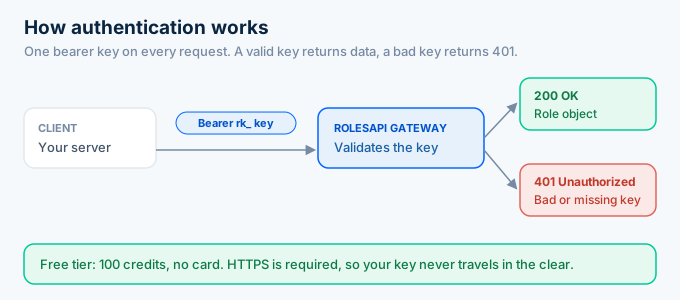
Getting a key takes a minute. Create a free account, open the dashboard, and generate one.
Keep it server-side. Put the key in an environment variable and never ship it in front-end code, because anyone can read a browser bundle.
Every request must use HTTPS. A plain HTTP call is refused, so your key never travels in the clear.
Here is an authenticated request.
curl https://api.rolesapi.com/v1/roles/a1b2c3d4e5f6 \ -H "Authorization: Bearer rk_live_your_key"That is the whole handshake. If the key is good, you get a role object back.
How do you get and manage your API key?
You manage keys from the RolesAPI dashboard: create one, rotate it when needed, and use a separate key per environment. Keys are long random strings prefixed with rk_, tied to your account and its credits. Store them server-side, rotate on a schedule, and revoke any key that leaks. A revoked or wrong key returns 401 on the very next request.
Use one key for production and another for local work. If your laptop key leaks, you rotate it without touching production.
Rotation is instant. Generate a new key, deploy it, then revoke the old one. Requests with the old key start returning 401 right away.
Never commit a key to git. Read it from an environment variable, and if you have to share config, share the variable name, not the value.
A 401 in your logs almost always means one of three things: a typo, a revoked key, or a key from the wrong environment. Check those first.
What endpoints does the Indeed API have?
The Indeed API has five endpoint groups: roles, search, jobs, account, and webhooks. Roles fetch and enrich individual postings. Search finds postings by keyword and location. Jobs run large async work. Account reports your identity and usage. Webhooks manage the signed callbacks that fire when async work finishes. Every group returns the same normalized role shape.
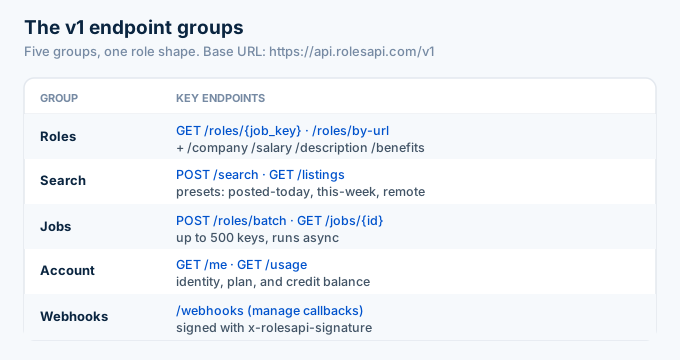
Most builds start with search, then role detail.
Every endpoint lives under the same base, https://api.rolesapi.com/v1, and the path is versioned, so an integration you write today keeps working as new fields ship.
Search takes a keyword, a location, and a country. It returns role summaries, each with a job key.
curl -X POST https://api.rolesapi.com/v1/search \ -H "Authorization: Bearer rk_live_your_key" \ -H "Content-Type: application/json" \ -d '{"query": "data engineer", "location": "Austin, TX", "country": "us"}'Take a job key from the results and fetch the full role. You can also pull a single sub-resource, like salary or company, when that is all you need. Skipping fields you do not use keeps your credit count down.
How do you search and paginate Indeed postings?
You search with a POST to /v1/search, passing a query, a location, and a country. It returns role summaries with job keys, up to three pages synchronously. For common needs, hit presets like posted-today, posted-this-week, or remote. For large result sets, run the async search-with-details job instead of paging by hand.
The three parameters cover most cases. Query is your keyword, location is a city or region, and country picks one of 60+ Indeed editions.
Presets save you filter logic. The listings presets return today’s roles, this week’s roles, or remote roles with no extra query.
Pagination stays simple. Synchronous search returns up to three pages, and a GET wrapper at /v1/listings makes quick searches easy to cache.
Need thousands of results with full detail? Use search-with-details. It searches, enriches each hit, and runs as an async job so you are not blocking on one long request.
How do you fetch a single role and its sub-resources?
You fetch one role two ways: by its Indeed job key with GET /v1/roles/{job_key}, or straight from an Indeed viewjob link with GET /v1/roles/by-url. Both return the full normalized role. Four sub-resources, company, salary, description, and benefits, return just that slice when you do not need the whole object.
The by-url endpoint helps when you already have Indeed links. Paste the viewjob URL and you get the normalized role without extracting the job key yourself.
The sub-resources map to the parts of a posting people actually use.
A salary tool calls /salary. A company page calls /company. A clean text view calls /description. Each one moves less data than the full role and keeps your response small.
Pick the narrowest endpoint that answers your question. It is faster to parse and cheaper to run.
What does an Indeed API response look like?
Every response uses the same envelope: a data object with the role, a meta object with request context, and rate and credit information in the headers. The role object itself carries title, company, location, salary, description, benefits, posted date, and job key. Because the shape never changes, your parsing code written for one endpoint works for all of them.
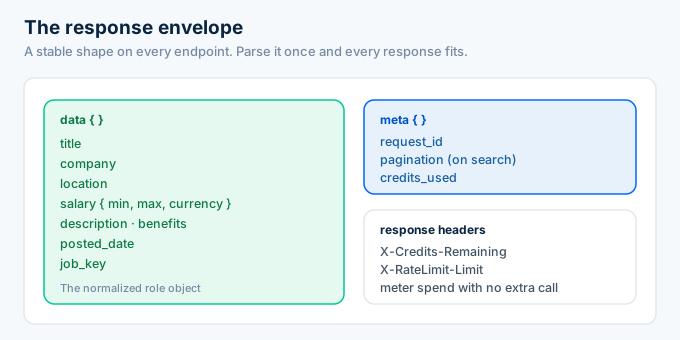
Here is a trimmed response so the shape is clear.
{ "data": { "job_key": "a1b2c3d4e5f6", "title": "Senior Data Engineer", "company": "Northwind Labs", "location": "Austin, TX", "salary": { "min": 150000, "max": 185000, "currency": "USD", "period": "year" }, "posted_date": "2026-07-11" }, "meta": { "request_id": "req_9f2c", "credits_used": 1 }}You read data.salary.max today and next quarter, no matter how the Indeed page changes underneath.
That stability is the point of a normalized API. The site can redesign itself, and your parser keeps working, because the contract lives with the API rather than the page.
Want a spreadsheet instead of JSON? Ask for CSV or NDJSON on the export endpoints, and use field projection to keep only the columns you care about.
The headers carry the operational data. Each response reports the credits the call used and how many remain, plus a request id you can quote if you ever open a support ticket.
That means you can meter spend without a second call. Read the credit header after each request and stop before you hit zero.
On search responses, the meta object also reports pagination, so you know whether more pages exist. On detail responses it holds the request id and the credits used. Same envelope, different fields filled in.
How do you handle errors and rate limits?
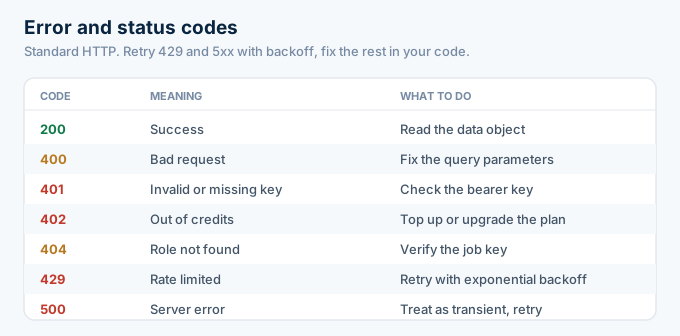
You handle them the way you would any REST API. Status codes are standard: 401 for a bad key, 402 when you are out of credits, 404 for a role that does not exist, and 429 when you hit the rate limit. Retry 429s with exponential backoff, treat 5xx as transient, and read the error body, which names the problem in plain text.
Rate limits scale with your plan.
The free tier allows 20 requests a minute. The 5 dollar monthly plan raises that to 200, and the annual plan to 300.
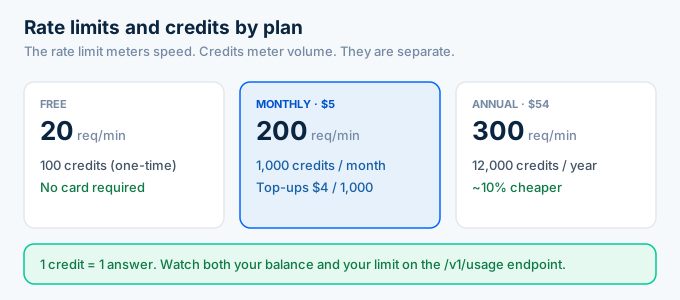
Credits are separate from the rate limit. One credit buys one answer, and you can watch your balance on the /v1/usage endpoint so nothing surprises you.
A good client retries the transient codes and gives up on the rest.
import time, requests
def get_role(job_key, key, tries=4):    for i in range(tries):        r = requests.get(            f"https://api.rolesapi.com/v1/roles/{job_key}",            headers={"Authorization": f"Bearer {key}"},        )        if r.status_code == 429 or r.status_code >= 500:            time.sleep(2 ** i)  # back off, then retry            continue        return r.json()    raise RuntimeError("giving up after retries")
That loop backs off on 429 and 5xx and returns on everything else. It is the only error handling most integrations need.
How do async jobs and webhooks work?
Async jobs handle work too big for one request. You post up to 500 job keys or URLs to the batch endpoint, RolesAPI processes them in the background, and a signed webhook hits your server when the job finishes. You verify the x-rolesapi-signature header, then read the results. Poll /v1/jobs only if you cannot receive a webhook.
Batch is how you enrich thousands of roles without a thousand calls.
Post the keys, get a job id back, and move on. The work runs on RolesAPI’s side.
When it finishes, RolesAPI signs a request to your webhook URL. You check the signature before trusting the payload, which stops anyone from faking a completion event.
import hmac, hashlib
def valid(body: bytes, signature: str, secret: str) -> bool:    expected = hmac.new(secret.encode(), body, hashlib.sha256).hexdigest()    return hmac.compare_digest(expected, signature)
If you cannot accept inbound webhooks, poll the /v1/jobs status endpoint instead. Webhooks are cheaper, because you react once instead of asking on a loop.
How do you keep Indeed API credit costs low?
You keep costs low by not fetching what you will not use. Cache role detail so a repeat view costs nothing, request a single sub-resource when you only need salary or company, use field projection to trim payloads, and batch large pulls instead of looping. Watch the /v1/usage endpoint so spend never surprises you.
Caching is the biggest lever. A posting does not change often, so store it and serve repeats from your own cache.
Sub-resources are next. If your feature only shows pay, call the salary endpoint, not the full role.
Batching is the third. One async job for 500 keys is easier to reason about than 500 separate calls.
None of this is premature optimization. On a credit model, these habits are the difference between a 5 dollar month and a top-up.
Can you use the Indeed API docs with AI agents and codegen?
Yes, and this is where the modern docs pull ahead of the old ones. RolesAPI ships an OpenAPI 3.1 contract you can feed to a code generator, an MCP server so agents can call tools like search_roles and get_role_by_key, and an llms.txt file that explains the API in prose an assistant can read. You do not need a hand-written SDK.
Point a generator at the OpenAPI spec and you get a typed client in your language.
Wire the MCP server into an agent and it discovers the tools on its own. No one has to describe the endpoints to it by hand.
That is the practical difference. The old Indeed docs assumed a human would read them. These assume a machine might.
The payoff is speed to integration. A developer generates a client and starts calling in minutes, and an agent reads the spec and starts calling with no developer at all.
The faster an API can be understood, the faster it gets used. Machine-readable docs are how you get there.
Frequently asked questions
Where is the Indeed API documentation?
There is no official public Indeed API doc anymore, since Indeed retired its developer program. The current equivalent is a third-party Indeed API’s reference. RolesAPI publishes a REST reference, an OpenAPI 3.1 spec, and an llms.txt file, and you can read every endpoint against a free tier of 100 credits with no card.
How do I authenticate with the Indeed API?
You authenticate with a bearer key. Send an Authorization: Bearer rk_... header on every request over HTTPS. There are no OAuth dances for basic use and no signing. Create a free RolesAPI account, generate a key in the dashboard, store it server-side, and you are ready to call any endpoint.
What format does the Indeed API return?
The Indeed API returns a normalized JSON role object inside a consistent response envelope, so every endpoint has the same shape. You can also request CSV or NDJSON when you are exporting to a spreadsheet or a data warehouse. Field projection lets you trim the payload to only the fields you need.
What do Indeed API error codes mean?
They follow standard HTTP. 200 is success, 400 is a bad request, 401 is a missing or invalid key, 402 signals you are out of credits, 404 means the role was not found, and 429 means you hit the rate limit. Retry 429s with exponential backoff and treat 5xx as transient.
What are the Indeed API rate limits?
Rate limits scale by plan: 20 requests per minute on the free tier, 200 on the 5 dollar monthly plan, and 300 on the annual plan. Credits are separate and metered per answer, one credit each. Check the /v1/usage endpoint to watch both your credit balance and your limit.
Is there an OpenAPI spec or SDK for the Indeed API?
Yes. RolesAPI ships an OpenAPI 3.1 contract you can feed to code generators, plus an MCP server and an llms.txt file so AI agents can call it directly. You do not need a bespoke SDK. Any HTTP client, or a generated client from the spec, works against the same bearer-auth endpoints.
Start building with the Indeed API
Skip the archived docs. The reference on this page is everything you need to make a real call.
Create a free RolesAPI key, send the authenticated search request above, then read one role by its job key. You get 100 credits and no card, so you can work through the whole endpoint list before you spend anything.
Bookmark this page as your quick reference. Auth is one header, the envelope never changes, and errors follow standard HTTP, so once the first call works, the rest of the surface follows the same rules.
For the bigger picture, read the complete Indeed API guide.