
You want Indeed listings inside your own app, not on Indeed’s site.
That means you need the postings as data: clean, structured, and ready to store and display. Not a web page you scrape and pray about.
An Indeed jobs API gives you exactly that. You send a keyword and a location, and you get back normalized role objects with the same fields every time. This guide shows how to pull those listings into your app, store them, keep them fresh, and what you can build once they are there. You can test the whole flow on a free tier of 100 credits.
What is an Indeed jobs API?
An Indeed jobs API is a hosted REST service that returns Indeed job listings as normalized JSON. You authenticate with a key, send a search, and receive clean role objects instead of raw HTML. The provider handles sourcing and parsing on its side, so your app just reads structured data. RolesAPI runs this across 60+ country editions, and every endpoint returns the same role shape.
The word doing the work there is normalized.
A raw Indeed page is markup that changes whenever their team ships a redesign. A normalized listing is a stable object your code can read the same way every time.
That difference is the entire reason to use an API instead of a scraper. You build against a contract, not a web page.
A contract does not move under you. When Indeed redesigns its site, a scraper breaks and an API call keeps returning the same object. Your app never notices the change.
What does a normalized Indeed listing look like?
A normalized Indeed listing is a role object with a fixed set of fields: title, company, location, salary, description, benefits, posted date, and job key. Salary is a structured block with a min, a max, and a currency, not a string you parse. The job key is a stable identifier you use to fetch detail or refresh the role later. Every listing has this shape, so one parser handles all of them.
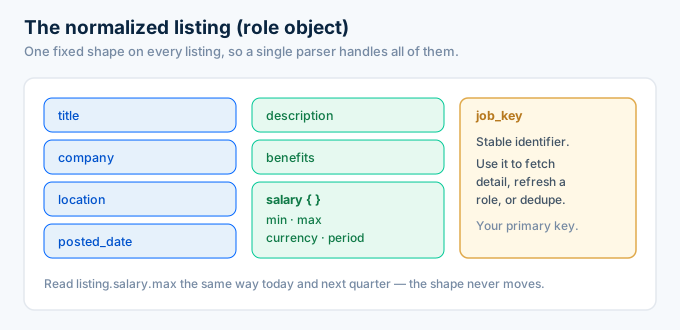
Here is a trimmed listing so the shape is clear.
{ "job_key": "a1b2c3d4e5f6", "title": "Senior Product Manager", "company": "Northwind Labs", "location": "Remote, US", "salary": { "min": 150000, "max": 190000, "currency": "USD", "period": "year" }, "posted_date": "2026-07-14"}You read listing.salary.max today and next quarter, no matter how the Indeed page changes underneath.
That stability is what makes the data safe to build on. Your database schema, your filters, and your UI all depend on a shape that does not move.
What does normalized job data actually mean?
Normalized means every listing arrives in the same clean structure, regardless of how the source page was arranged. Different Indeed editions and templates get flattened into one consistent object. Salary is always a field. Location is always a field. Your code never has to special-case a layout, because the layout is gone by the time you see the data.
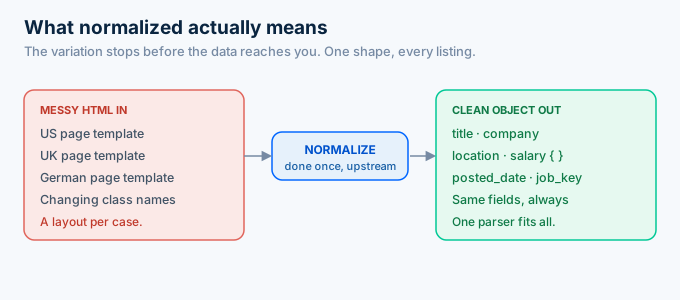
This is the part scrapers never solve.
A scraper reads whatever the page looks like today, so your code fills with special cases for each layout and country. Every edge case is yours to find and yours to maintain.
An API moves that work upstream. The provider normalizes once, and every consumer gets the clean result.
How do you pull Indeed listings into your app?
You pull listings with two calls: search, then detail. You send a keyword and location to the search endpoint, which returns role summaries, each with a job key. You then fetch full detail by job key for the roles you want to keep. Both calls return the same role object, so you store and render them the same way. There is no HTML to parse.
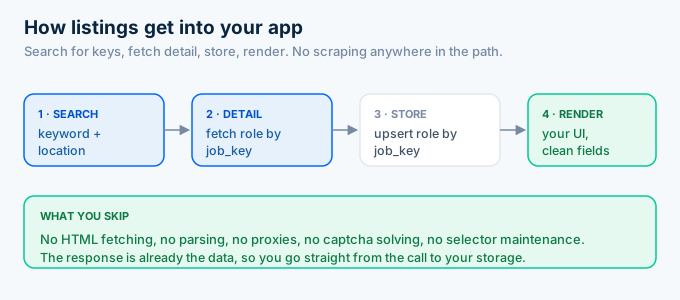
Start with search. You almost always find listings before you enrich them.
import requests
key = "rk_live_your_key"
resp = requests.post(    "https://api.rolesapi.com/v1/search",    headers={"Authorization": f"Bearer {key}"},    json={"query": "product manager", "location": "Remote", "country": "us"},)listings = resp.json()["data"]
That returns a list of summaries. Each one carries a job key you use to fetch the full role.
Notice there is no parsing step. The response is already the data you wanted, so you go straight from the call to your storage layer. That is the whole difference between an API and a scraper in one line of code.
How does the search-then-detail pattern work?
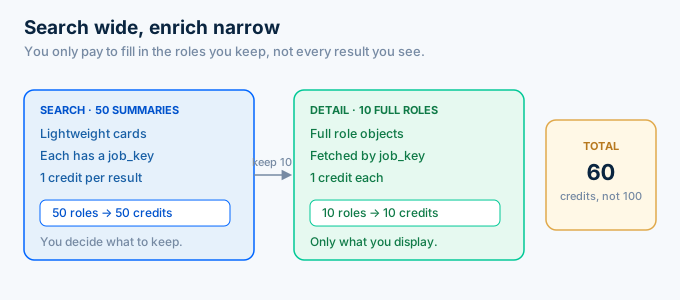
Search returns lightweight summaries so you can decide what you actually need, and detail returns the full role for the ones you keep. This two-step pattern saves credits, because you only pay to enrich the listings that matter. A search of 50 roles costs 50 credits, and you might fetch full detail on just the 10 you display.
Fetching detail is one call per key.
def get_detail(job_key, key):    r = requests.get(        f"https://api.rolesapi.com/v1/roles/{job_key}",        headers={"Authorization": f"Bearer {key}"},    )    return r.json()["data"]
for summary in listings:    role = get_detail(summary["job_key"], key)    db.upsert(role)  # your storage layer
If you need detail on hundreds of roles, do not loop single calls. Post the keys to the batch endpoint and let it run async instead.
How do you target the right listings?
You target listings with three search inputs and a set of presets. Query is your keyword, location is a city or region, and country picks one of 60+ Indeed editions. For common needs, use presets like posted-today, posted-this-week, or remote, so you filter at the source instead of pulling everything and discarding most of it.
Tight targeting saves credits. Every result you get back costs one, so a narrow query that returns the roles you want beats a broad one you filter later.
Use the country parameter deliberately. The same keyword returns different roles on the US, UK, and German editions, and you choose which with one field.
Presets replace filter logic. Posted-today gives you the freshest roles, remote gives you remote-friendly ones, and you skip writing that logic yourself.
Start narrow and widen only if you need more. It is cheaper than starting wide and trimming.
How do you handle volume and pagination?
For small pulls, page through search results synchronously, up to three pages at a time. For large or ongoing pulls, switch to the async batch and search-with-details jobs, which enrich many roles in the background and signal you with a webhook when they finish. This keeps a big pull off your request path and out of a timeout.
Synchronous is fine for a page of results. You call search, read the roles, and move on.
Async is for scale. When you need thousands of roles with full detail, a single blocking request is the wrong tool.
Post the keys to the batch endpoint, get a job id, and let it run. The API works through the list on its side.
When it finishes, a signed webhook hits your server, and you ingest the results in one pass. No polling, no long-held connections.
How much does pulling listings cost?
Pulling listings costs one credit per answer. A search that returns 50 roles costs 50 credits, and each detail fetch costs one more. On RolesAPI that is about half a cent per answer, so 1,000 answers is 5 dollars. Caching, tight queries, and the search-then-detail split all keep that number low.
The two-step pattern is a cost control, not just a workflow.
You pay 50 credits to see 50 summaries, then pay to enrich only the 10 you keep. You are not buying full detail on roles you will never show.
Caching is the bigger lever. A posting does not change often, so store it and serve repeats from your own cache instead of re-fetching.
Set your refresh cadence to match the product. Weekly instead of daily cuts your credit count by seven, and most listings do not change that fast.
How do you store and display the listings?
You store each role object as a row keyed by its job key, then render the fields your UI needs. Because the shape is fixed, your schema is simple: a column per field, or a JSON column for the whole object. The job key is your primary key, which makes refreshing a role or removing a closed one straightforward.
Keep the job key as your unique identifier.
It is stable, so the same posting always maps to the same row. That is what lets you update a role in place instead of creating duplicates.
Store the posted date too. You will use it to sort by freshness and to expire old roles that are no longer worth showing.
For display, you already have clean fields. Title, company, location, and salary render directly, with no cleanup step between the API and your page.
Handle duplicates and closings with the job key. If a role reappears in a later search, you upsert on its key instead of inserting a second copy.
Expire old roles on the posted date. A listing from four months ago is usually closed, so drop it from your index rather than showing something stale.
How do you keep your Indeed listings fresh?
You keep them fresh with scheduled pulls and webhooks, not by re-scraping. Run a search on the cadence your product needs, enrich the new job keys through the batch endpoint, and let a signed webhook tell you when the job finishes. Cache each role so you never pay to fetch the same posting twice, and expire roles past a certain age.
Freshness is a product decision, not a technical one.
A job board that promises new roles daily needs a nightly pull. A salary dashboard can refresh weekly and be fine.
Pick the cadence, schedule the search, and only fetch detail on keys you have not seen before. That keeps your data current and your credit count low at the same time.
The webhook is the part people skip. Without it, you poll a job status endpoint on a loop and waste calls. With it, the API signs a request to your server the moment a batch finishes, and you react once.
Which countries does the Indeed jobs API cover?
RolesAPI covers more than 60 Indeed country editions from a single country parameter. You do not build a separate integration for the UK, then another for Germany. You change a country code, and the same normalized role object comes back for every market.
Coverage is where a scraper falls behind fastest.
A scraper you wrote for the US site does not read the UK or German editions without new selectors and new proxies for each one.
With an API, every market is a parameter you already have. The role object is identical across all of them, so your code does not branch by country.
That matters the moment your product expands. New countries become configuration, not engineering.
What can you build with an Indeed jobs API?
You can build job boards, aggregators, salary and market dashboards, and AI agents on top of an Indeed jobs API. Anything that needs live listings as data is a fit. Because every product reads the same role object, your data layer stays identical no matter what you put on top of it.
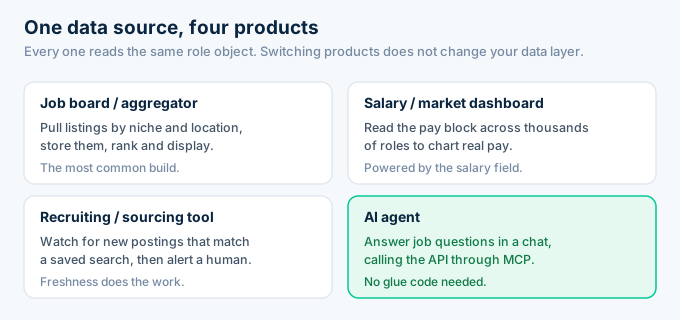
Job boards and aggregators are the common case. You pull listings by niche and location, store them, and rank and display them.
Salary tools read the pay block across thousands of roles to chart what a title actually earns in a market.
Recruiting and sourcing tools watch for new postings that match a saved search, then alert a human.
Agents answer job questions inside a chat, calling the API through MCP instead of guessing. RolesAPI ships an MCP server and an OpenAPI contract, so an assistant can pull listings with no glue code.
The pattern under all four is the same. You pull listings once, store the clean objects, and build whatever you want on top. Switching from a job board to a salary tool changes your product, not your data layer.
That is the payoff of normalized data. The hard part is solved before your code runs, so your time goes to the thing your users actually see.
Frequently asked questions
What is an Indeed jobs API?
An Indeed jobs API is a hosted REST service that returns Indeed job listings as normalized JSON. You send a keyword and location, and it returns clean role objects with the same fields every time, so you can display and store postings without scraping. RolesAPI provides this across 60+ country editions, starting free with 100 credits.
How do I pull Indeed listings into my app?
You call the search endpoint with a keyword and location, read the returned role summaries, then fetch full detail by job key for the ones you want. Each response is a normalized role object you save to your database and render. No HTML parsing, no proxies. Most integrations take an afternoon.
What fields does an Indeed listing include?
A normalized Indeed listing includes the title, company, location, salary, description, benefits, posted date, and job key. The job key is a stable identifier you use to fetch detail or refresh the role later. RolesAPI returns the same shape on every endpoint, so your parsing code works everywhere.
What does normalized job data mean?
Normalized means every listing comes back in the same clean structure, no matter how the source page was laid out. Salary is always a structured field, location is always a field, and the shape never changes between roles or countries. That stability is what lets your code read a listing the same way every time.
How do I keep my Indeed listings up to date?
You schedule a search on the cadence your product needs, enrich new job keys through the batch endpoint, and let a signed webhook tell you when the job finishes. Cache each role so you never fetch the same posting twice. A job board might refresh nightly, while a research tool can refresh weekly.
Can I use an Indeed jobs API for a job board?
Yes. A job board is the most common use. You pull listings by niche and location, store the normalized role objects, and render them on your pages. Because the data is already clean, you skip the scraping and parsing layer entirely and spend your time on the product. RolesAPI covers 60+ countries from one parameter.
Pull your first Indeed listings today
Stop trying to scrape a web page into your database. The clean version is one search call away.
Create a free RolesAPI key, send the search above, then fetch detail on one role and save it. You get 100 credits and no card, which is enough to wire the whole flow end to end before you pay anything.
For the bigger picture, read the complete Indeed API guide, the endpoint documentation, or the pricing breakdown.