
You want to search Indeed from your own code, with a keyword and a location, and get results back as data.
That is the exact job of an Indeed job search API. No browser, no scraping, no parsing a results page.
Here is how it works. You send a query, a location, and a country to a search endpoint, and you get normalized role summaries back, each carrying a job key. You then read full detail on the ones you want. This guide covers the search parameters, the freshness presets, pagination, and the cost, with code you can run in a few minutes. The free tier is 100 credits with no card.
What is an Indeed job search API?
An Indeed job search API is a REST endpoint that takes a keyword and a location and returns matching Indeed postings as structured data. Instead of loading a results page, you send a request and receive a list of normalized role summaries, each with a job key. RolesAPI runs this across 60+ country editions, and every result comes back in the same shape.
Search is usually the first call any integration makes.
You almost always need to find postings before you do anything else with them, so the search endpoint is where most projects start.
The results are summaries, not full postings. Each carries enough to display a card and a job key you use to fetch the complete role when you need it.
This split is deliberate. A summary is cheap to move and enough to render a list, and you only pay for the heavier full posting on the roles a user actually opens.
How do you search Indeed jobs by keyword and location?
You POST three fields to the search endpoint: a query, a location, and a country. The query is your keyword, the location is a city or region, and the country selects the Indeed edition. The response is a list of role summaries, each with a job key you can pass to the detail endpoint. There is no results page to scrape.
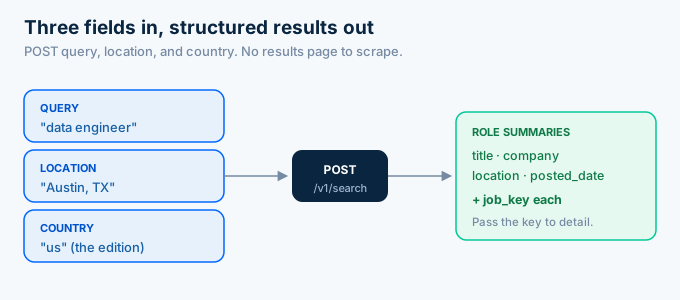
Here is a search in a single call.
curl -X POST https://api.rolesapi.com/v1/search \ -H "Authorization: Bearer rk_live_your_key" \ -H "Content-Type: application/json" \ -d '{"query": "data engineer", "location": "Austin, TX", "country": "us"}'And the same thing in Python.
import os, requests
key = os.environ["ROLESAPI_KEY"]
r = requests.post(    "https://api.rolesapi.com/v1/search",    headers={"Authorization": f"Bearer {key}"},    json={"query": "data engineer", "location": "Austin, TX", "country": "us"},)results = r.json()["data"]
for role in results:    print(role["title"], role["company"], role["job_key"])
Each result carries a job key. That key is your handle for reading the full posting or storing the role.
How do you write a good search query?
A good query is specific enough to return roles you want and broad enough not to miss them. Use the terms a posting would actually contain, pair them with a real location, and lean on presets for freshness rather than stuffing the query. A tight query returns fewer irrelevant results, which means fewer credits spent and less filtering on your side.
Match the language of the posting, not the language of a candidate.
An employer writes “backend engineer”, so that returns more than “coding job”. Search the words that appear in the listing itself.
Keep the location realistic. A metro area like “Austin, TX” returns more than a tiny suburb, and a remote preset beats typing “remote” into the query.
Start narrow and widen if you come up short. It is cheaper than starting broad and paying to discard half the results.
How do you handle duplicate results across searches?
You dedupe on the job key, which is stable across searches. If the same role appears in two queries, or in today’s and tomorrow’s pull, it carries the same key both times. Keying your storage on the job key means a repeat is an update, not a second row, so your index stays clean without extra work.
Run the dedupe at write time.
When a search result arrives, upsert it by job key. A role you already have gets refreshed in place, and a new one gets inserted.
This matters most when you run overlapping searches. Two related queries will surface some of the same roles, and the job key is what stops them from doubling up.
Store the first-seen date alongside the posted date. It lets you tell a genuinely new role from one that simply reappeared in a later search.
How does the country parameter work?
The country parameter selects which Indeed edition you search. The same keyword returns different roles on the US, UK, or German editions, and you switch between them with one field. This is how you cover 60+ markets without building a separate integration for each. The results come back normalized regardless of which edition produced them.
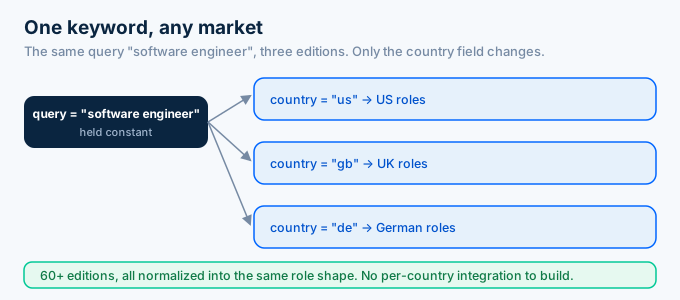
This matters the moment your product crosses a border.
A scraper written for the US site does not read the UK or German editions without new work for each one. Here, expanding to a new country is a parameter you already have.
Location and country work together. Country picks the edition, and location narrows within it, so a US search for “Austin, TX” and a UK search for “London” use the same two fields.
Get the country right and the rest follows. A US location string against the UK edition returns little, so the two fields should agree.
For a global product, iterate the country field over your target markets and run the same query in each. The results merge into one clean set because the shape never changes.
How do you get only recent or remote jobs?
Use the listings presets instead of writing filter logic. Posted-today and posted-this-week filter by freshness, and remote returns remote-friendly roles. Presets run at the source, so you pull fewer irrelevant results and spend fewer credits than fetching everything and filtering in your own code. They are the fastest way to a focused result set.
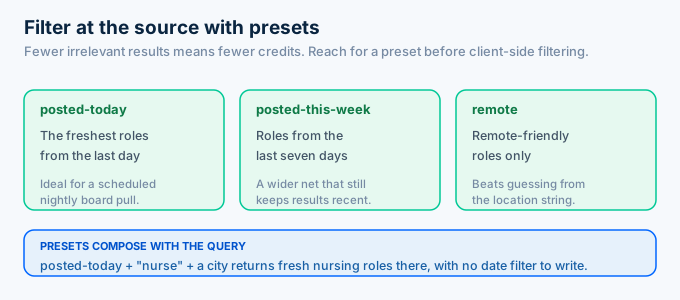
Freshness presets are the common case for a job board.
A board that promises new roles pulls posted-today on a schedule, so it only ever ingests roles it has not seen. That keeps both the index current and the credit count low.
The remote preset saves a surprising amount of noise. Remote-friendly filtering at the source beats pulling every role and guessing from the location string.
Reach for a preset before you reach for client-side filtering. Every result you filter out after the fact is a credit you already spent.
Presets also compose with the query. A posted-today search for “nurse” in a city returns fresh nursing roles there, without you writing a date filter or a remote check.
That is the pattern to internalize. Push every filter you can to the source, and let your own code handle only what the API cannot.
How much of the results can you get at once?
Synchronous search returns up to three pages of results in one flow. That is enough for most interactive searches, where a user is looking at a page of roles. For anything larger, or when you need full detail on every result, use the async search-with-details job, which runs in the background and signals your server with a webhook when it finishes.
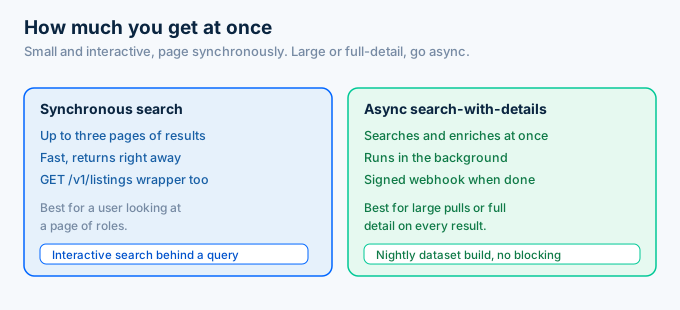
Pick the path by how the search is used.
An interactive search behind a user’s query wants a fast synchronous response with a page of results. A nightly pull building a dataset wants the async job that does not block.
The async search-with-details job is the efficient choice for scale. It searches and enriches in one operation, so you are not running a search and then a thousand detail calls by hand.
For quick, cacheable searches there is also a GET wrapper at /v1/listings, which is handy when you want a simple URL you can cache at the edge.
How do you go from a search result to a full posting?
You take the job key from a search result and pass it to the detail endpoint. Search returns lightweight summaries so you can decide what to keep, and detail returns the full role for the ones you want. This two-step pattern saves credits, because you only enrich the roles you actually use.
def get_detail(job_key, key):    r = requests.get(        f"https://api.rolesapi.com/v1/roles/{job_key}",        headers={"Authorization": f"Bearer {key}"},    )    return r.json()["data"]
for role in results[:10]:    full = get_detail(role["job_key"], key)    db.upsert(full)
Search wide, enrich narrow.
A search of 25 roles costs 25 credits, and you might fetch full detail on only the 10 you display. You are not paying to enrich roles nobody sees.
If you need detail on hundreds of results, do not loop. Post the keys to the batch endpoint and let it run async.
How do you rank and display the results?
You rank results with your own logic, because the API returns roles as data rather than a fixed order you must accept. Sort by posted date for freshness, by salary for a pay-first board, or by how well the title matches the user’s intent. Since every field is structured, sorting and filtering happen in your database, not in a scraped string.
Freshness is the safe default. Most job seekers want the newest roles first, and the posted date makes that a one-line sort.
Salary sorting is possible because the pay block is structured. You compare a numeric max across roles without parsing “$150k a year” out of text.
Relevance is yours to tune. You already have the title and the description, so you can score how closely a role matches what the user asked for.
The point is that you own the ranking. The API hands you clean fields, and what you do with them is a product decision.
Can an AI agent run these searches?
Yes. Because the search endpoint is plain REST with a clear contract, an agent can call it directly. RolesAPI also ships an MCP server, so an assistant can run a job search as a tool without any glue code. A user asks for “remote data roles in Berlin”, and the agent turns that into a query, a location, a country, and a preset.
Natural language maps cleanly onto the parameters.
A request like “recent marketing jobs in London” becomes a query of marketing, a location of London, a country of gb, and the posted-this-week preset. The mapping is mechanical, which is exactly what an agent is good at.
The structured response is what makes this work. The agent gets back clean fields it can summarize or compare, not a page it has to read.
This is where search stops being a form and becomes a conversation. The user describes what they want, and the agent runs the query behind the scenes.
No parsing, no scraping, no glue. The agent reads the same job keys and titles your own code would, and acts on them.
What does searching Indeed cost?
You pay one credit per result returned, which is about half a cent. A search that returns 25 roles costs 25 credits. The search request itself is not billed separately, so the cost tracks how many results you pull, not how many times you search. RolesAPI starts free with 100 credits, then 5 dollars a month for 1,000.
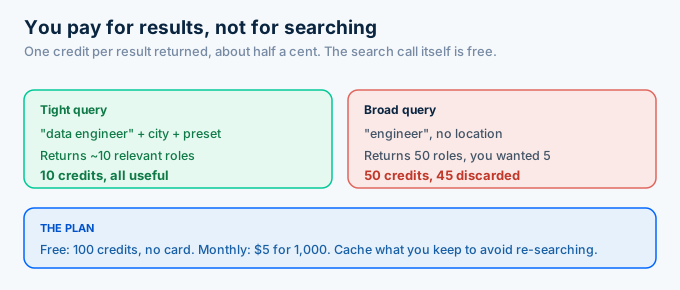
This is why query tightness is a cost lever.
A broad query that returns 50 roles when you needed 5 costs you 45 credits for results you discard. A narrow query with a real location and a preset returns closer to what you want.
Cache the roles you keep. A posting does not change often, so store it by job key and serve repeats from your own database rather than re-searching.
Set your search cadence to the product. A board refreshing hourly spends far more than one refreshing daily, and most listings do not change fast enough to justify the difference.
Frequently asked questions
What is an Indeed job search API?
An Indeed job search API lets you search live Indeed postings by keyword and location and get back structured results. You send a query, a location, and a country, and receive normalized role summaries, each with a job key. RolesAPI provides this over REST across 60+ country editions, starting free with 100 credits and no card.
How do I search Indeed jobs by keyword and location?
You POST a query, a location, and a country to the search endpoint. The query is your keyword, the location is a city or region, and the country picks the Indeed edition. The response is a list of role summaries with job keys you can pass to the detail endpoint to read the full posting.
Can I search Indeed jobs by country?
Yes. A country parameter selects one of 60+ Indeed editions, so the same keyword returns roles from the US, UK, Germany, or any supported market. You do not build a separate integration per country. You change one field, and the normalized results come back in the same shape every time.
How do I get only recent or remote Indeed jobs?
Use the listings presets. Posted-today and posted-this-week filter by freshness, and remote returns remote-friendly roles, all without writing filter logic yourself. Presets run at the source, so you pull fewer irrelevant results and spend fewer credits than fetching everything and filtering in your own code.
How many results does an Indeed search return?
Synchronous search returns up to three pages of results. Each result costs one credit. For larger pulls with full detail on every role, use the async search-with-details job instead of paging by hand, which runs in the background and signals your server with a webhook when it finishes.
How much does searching Indeed cost?
One credit per result returned, which is about half a cent. A search returning 25 roles costs 25 credits. RolesAPI starts free with 100 credits, then 5 dollars a month for 1,000. Tight queries and presets keep the count down, because you pay for results, not for the search itself.
Run your first Indeed search today
Stop loading a results page you have to scrape. One POST returns the same roles as clean data.
Create a free RolesAPI key, send the search request above, and read the titles and job keys that come back. Then pass one key to the detail endpoint to see a full posting. You get 100 credits and no card, which is enough to build the whole search-to-detail flow.
Watch your first search closely. A broad query burns credits fast, so start narrow, count the results, and you will know your burn rate before you spend a cent on a plan.
For the wider picture, read the complete Indeed API guide, the endpoint documentation, or the guide to pulling listings into your app.