
Want to see exactly how an Indeed scraper works? The best way is to build one.
This is a step-by-step Python tutorial. You will fetch a search page, parse the job cards, page through results, and store the data.
It is also an honest one. A scraper is a great way to learn how job data flows, and a poor way to run a product, because it breaks every time Indeed changes its site. So the last step shows the same result through an API, which is the version most teams end up shipping. Follow along, then decide which you want to maintain.
What will this Indeed scraper do?
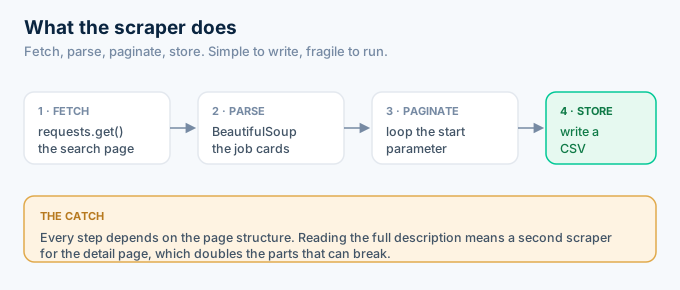
The scraper takes a keyword and a location, requests the Indeed search page, and pulls the title, company, and location out of each job card. It follows pagination to collect more than one page, then writes the results to a file. That is the full loop: fetch, parse, paginate, store. Every step depends on the page structure staying the same.
Keep the scope realistic.
This gets you a working scraper for a search page. Reading the full description means a second scraper for the detail page, which doubles the parts that can break.
Step 1: Set up the project
You need two libraries to start: requests to fetch pages and BeautifulSoup to parse HTML. Install them into a virtual environment so the project stays isolated. That is the entire toolchain for a basic scraper, though you will add more once anti-bot defenses get in the way.
python -m venv venvsource venv/bin/activatepip install requests beautifulsoup4Create one file to work in.
touch scraper.pyThat is the whole setup. Two dependencies and a file.
You need Python 3.9 or newer, and that is it. No API key, no account, nothing to sign up for, which is exactly why scraping feels appealing at the start.
Everything after this is the part that does not stay simple.
Step 2: Fetch the Indeed search page
You build the search URL from your keyword and location, then request it with a browser-like user agent. Without that header, many sites return a blank or blocked response. This step is where the first friction shows up, because a bare script from one address is easy to flag.
import requests
def fetch_page(query, location, start=0):    url = "https://www.indeed.com/jobs"    params = {"q": query, "l": location, "start": start}    headers = {"User-Agent": "Mozilla/5.0 (Windows NT 10.0; Win64; x64)"}    resp = requests.get(url, params=params, headers=headers, timeout=20)    resp.raise_for_status()    return resp.text
The start parameter is how Indeed paginates. Page one is 0, page two is 10, and so on.
Run this and you might get HTML back. You might also get a challenge page, which looks like success to your code but contains no jobs.
Step 3: Parse the job cards
You load the HTML into BeautifulSoup and select the job cards, then pull the title, company, and location out of each one. This is the most brittle step, because it depends on CSS class names that Indeed can rename in any release. When they do, your selectors match nothing and the scraper quietly returns an empty list.
from bs4 import BeautifulSoup
def parse_jobs(html):    soup = BeautifulSoup(html, "html.parser")    jobs = []    for card in soup.select("div.job_seen_beacon"):        title = card.select_one("h2.jobTitle")        company = card.select_one("[data-testid='company-name']")        location = card.select_one("[data-testid='text-location']")        jobs.append({            "title": title.get_text(strip=True) if title else None,            "company": company.get_text(strip=True) if company else None,            "location": location.get_text(strip=True) if location else None,        })    return jobs
Notice the defensive checks. Each field might be missing, so you guard against None or the whole thing crashes on one odd card.
The selector div.job_seen_beacon is the line most likely to break. Bookmark that fact, because you will be back to update it.
Step 4: Handle pagination
You loop over the start values to collect several pages, pausing between requests so you do not hammer the site. The pause matters. Firing requests as fast as Python can send them is the quickest way to get your IP blocked, so a short delay is the minimum politeness that keeps you running a little longer.
import time
def scrape(query, location, pages=3):    all_jobs = []    for page in range(pages):        html = fetch_page(query, location, start=page * 10)        all_jobs.extend(parse_jobs(html))        time.sleep(2)  # be polite, and stay unblocked longer    return all_jobs
Two seconds is a starting point, not a guarantee.
Scrape a few pages and it works. Scrape a few hundred and the delays will not save you, because the pattern of a single client pulling every page is itself a signal.
Step 5: Store the results
You write the collected jobs to a file so the data survives the run. A CSV is enough for a first version, and Python’s standard library handles it with no extra dependency. This is the one step that does not fight you, because it never touches Indeed.
import csv
def save_csv(jobs, path="jobs.csv"):    with open(path, "w", newline="") as f:        writer = csv.DictWriter(f, fieldnames=["title", "company", "location"])        writer.writeheader()        writer.writerows(jobs)
if __name__ == "__main__":    jobs = scrape("data engineer", "Austin, TX", pages=3)    save_csv(jobs)    print(f"Saved {len(jobs)} jobs")
Run the whole thing and you have a CSV of jobs.
That is a complete Indeed scraper in Python. It also has a shelf life, and the next section is about why.
How do you make the scraper more resilient?
You add retries, randomized delays, and a reused session so the scraper survives longer under real conditions. These do not make scraping reliable, but they push back the point where it fails. A request occasionally times out or returns a bad status, and a scraper that gives up on the first hiccup will not finish a run.
Wrap the fetch in a retry with backoff. If a request fails, wait a little longer and try again, then give up after a few attempts rather than crashing the whole job.
Randomize the delay between pages instead of using a fixed two seconds. A perfectly regular request pattern is easy to spot, so a jittered pause looks slightly more human.
Reuse a single requests.Session across calls. It keeps connections warm and carries cookies, which is both faster and a little less obviously automated.
Be honest about what this buys you. Every one of these techniques delays the block rather than preventing it, because the other side is actively looking for exactly these patterns.
How do you test each step while building it?
You test a scraper from the inside out, one function at a time, because a failure at any step looks identical from the end: no jobs. Print the raw HTML length after fetching, print the number of cards after parsing, and print the row count after saving. Each check tells you which step actually failed.
Start with the fetch. Print len(html) and open the response in a browser if it looks short, because a challenge page is much smaller than a real results page.
Then the parse. Print how many cards the selector matched before you extract fields. Zero cards means the selector is wrong or you were blocked, not that there are no jobs.
Save a copy of the HTML to disk while developing. When the parser breaks later, you can compare the new markup against the version your selectors were written for.
These three prints turn a silent failure into an obvious one. Without them, you are guessing which of four things went wrong.
Why will this scraper break?
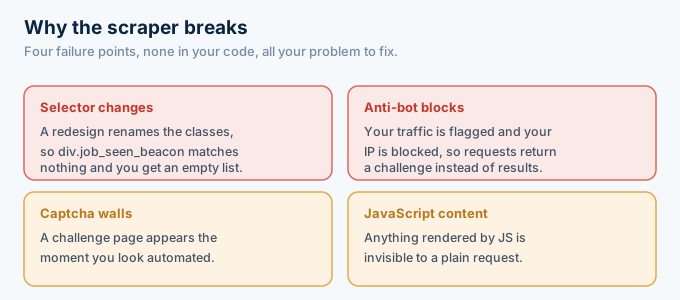
It will break because it depends on things Indeed controls and changes. The CSS selectors stop matching after a redesign. The anti-bot systems flag your traffic and block your IP. A captcha wall appears. JavaScript-rendered content stays invisible to requests. Each of these is outside your code, yet every one of them lands on your desk to fix.
The empty list is the classic symptom.
Your scraper ran, hit no error, and returned nothing, because the selector changed and matched zero cards. You find out when a user asks where the jobs went.
That silent failure is what makes scrapers dangerous in production. A crash you notice immediately, but an empty result looks like a slow day of hiring until you check the logs.
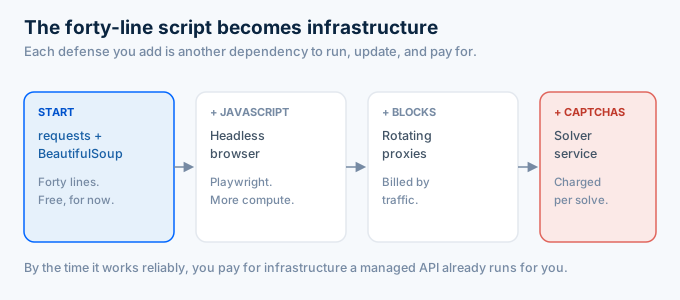
Getting past these means adding a headless browser for JavaScript, rotating proxies for blocks, and a captcha solver for the walls. Each addition is another dependency to run and update.
There is a cost to each layer, and it is not only your time. Residential proxies are billed by traffic, headless browsers burn more compute than a plain request, and captcha solvers charge per solve.
So the free scraper stops being free. By the time it works reliably, you are paying for infrastructure that a managed API already runs for you.
This is the moment most teams reconsider.
The scraper that saved a subscription now costs a day of engineering every time Indeed ships a change. The data was never the hard part. The upkeep was.
What about scraping the full job description?
Getting the description means a second scraper for the detail page, which roughly doubles your maintenance. The search page gives you the title, company, and location. The full description, the benefits, and often the salary live on each posting’s own page, behind its own layout and its own selectors.
So a real scrape is two scrapers. One for the results list, and one for every posting you open.
That second layer is more requests, which means more chances to get blocked, and more selectors, which means more things that break on a redesign.
It is also where the markup is messiest. A scraped description arrives full of navigation, boilerplate, and stray tags, so you write cleanup code on top of the scraping code.
An API collapses this. You search, then fetch detail by job key, and both return the same clean object with the description already parsed to text.
Is it legal and ethical to scrape Indeed?
Scraping Indeed sits in a gray area, and the responsible default is caution. Indeed’s terms discourage unauthorized scraping, and it enforces them with active anti-bot systems, so aggressive scraping can get your addresses blocked and your project flagged. Public data carries some legal nuance, but the terms are clear and the risk is real.
This is not legal advice, and your use case matters.
At a minimum, respect the site. Rate-limit your requests, do not try to defeat protections you were clearly not meant to bypass, and read the terms before you build anything on top.
For most teams the calculus is simple. A compliant third-party API reads the same public postings under its own terms, which takes the legal question off your plate entirely.
How does the API version compare?
The API version replaces every step above with one authenticated request. There is no page to fetch, no HTML to parse, no pagination loop to babysit, and no proxies or captchas to manage. You send a keyword and location, and you read normalized JSON back. The same result, with nothing to maintain when Indeed changes its site.
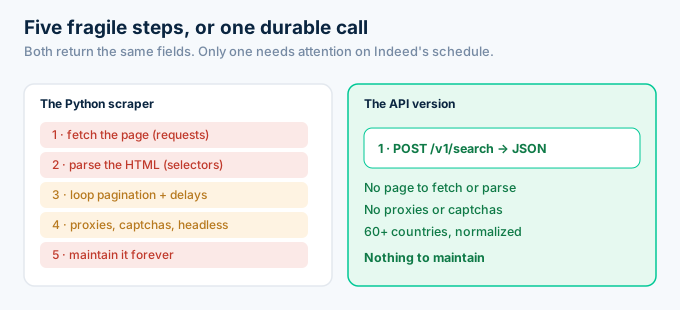
Here is the whole scraper, reduced to one call.
import os, requests
key = os.environ["ROLESAPI_KEY"]
def search(query, location):    r = requests.post(        "https://api.rolesapi.com/v1/search",        headers={"Authorization": f"Bearer {key}"},        json={"query": query, "location": location, "country": "us"},    )    return r.json()["data"]
jobs = search("data engineer", "Austin, TX")print(f"Got {len(jobs)} jobs")
No selectors, no delays, no user-agent games.
That function returns the same title, company, and location your scraper collected, plus salary and description if you fetch detail, across 60+ countries. When Indeed redesigns its site, this code does not notice, because it never read the page.
Compare the two files side by side and the difference is stark. The scraper is five functions and a growing list of dependencies. The API version is one function and a key.
That gap only widens over time. The scraper needs attention on Indeed’s schedule, while the API call keeps returning the same shape on yours.
Which one should you build?
Build the scraper to learn, and use the API to ship. Writing the scraper teaches you how job data is structured and why it is hard to get reliably, which is genuinely worth doing once. But for anything that runs more than a few times, the API removes the maintenance that makes scraping expensive. The choice is really about whose time the upkeep costs.
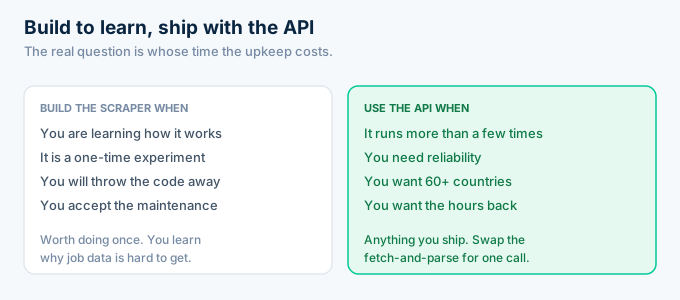
For a throwaway experiment, the scraper is fine, and you learned something building it.
For a product, the API wins on every axis that matters after launch: reliability, coverage, compliance, and the engineer-hours you get back.
There is a middle path too. Build the scraper this weekend to understand the data, then swap the fetch-and-parse functions for the single API call before you put anything in front of users.
Your storage and display code does not change in that swap, because both return the same fields. You keep everything that was actually yours and drop only the part that breaks.
Frequently asked questions
How do I build an Indeed job scraper in Python?
You install requests and BeautifulSoup, fetch the Indeed search URL for your keyword and location, parse the job cards out of the HTML, loop through pages, and store the fields. It is about forty lines to start. The hard part is not the code, it is keeping it working when Indeed changes its layout or blocks your requests.
What Python libraries do I need to scrape Indeed?
For a basic scraper, requests to fetch pages and BeautifulSoup to parse them. For JavaScript-heavy pages you add a headless browser like Playwright or Selenium. To avoid blocks at any scale you also need rotating proxies. Each addition is more to install, run, and maintain over time.
Why does my Python Indeed scraper return an empty list?
Usually because the CSS selectors no longer match. When Indeed ships a redesign, class names change and your parser finds nothing, so it returns an empty list with no error. It can also mean you were blocked and served a challenge page instead of results. Both are normal failure modes for scrapers.
Is it legal to scrape Indeed with Python?
Indeed’s terms discourage unauthorized scraping, and it enforces that with anti-bot systems. Public data has some legal nuance, but the risk is real. For anything beyond a one-off experiment, reading the same postings through a compliant third-party Indeed API is the safer and lower-maintenance path.
How do I avoid getting blocked scraping Indeed in Python?
Slow your request rate, rotate residential proxies, vary your user agent, and use a headless browser so pages render like a real visit. None of it is permanent, because anti-bot systems adapt. Each technique buys time rather than solving the problem, which is why many teams switch to an API.
What is the easiest alternative to a Python Indeed scraper?
A managed Indeed API. Instead of fetching and parsing HTML, you send one authenticated request and read normalized JSON. There are no selectors, proxies, or captchas to maintain. RolesAPI returns the same fields your scraper was after, across 60+ countries, and starts free with 100 credits.
Skip the maintenance and ship
You now know how an Indeed scraper works, line by line. That knowledge is worth having, and so is knowing when not to run one.
If you are shipping a product, the version that lasts is the API call. It returns the same data with nothing to fix when Indeed changes its site.
Create a free RolesAPI key and replace the scraper with one request. You get 100 credits and no card. For the wider picture, read the complete Indeed API guide, the guide to scraping Indeed and why an API is better, or the endpoint documentation.