

You went looking for an Indeed API key and found a signup form that goes nowhere.
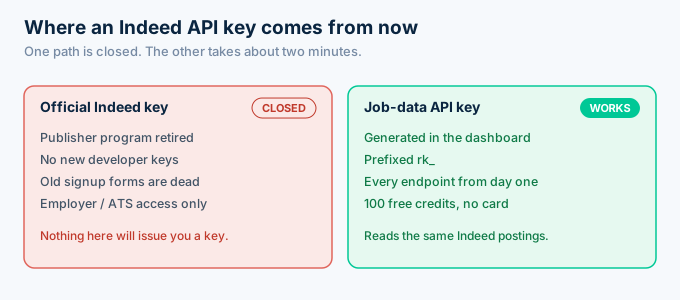
That is not a mistake on your end. Indeed retired its public developer program, so there is no key to request anymore.
Here is what works instead. You get a key from a third-party Indeed API that returns the same postings as normalized JSON. This guide shows why the official key is gone, how to get a working key in about two minutes, how to send your first authenticated request, and how to keep that key safe. The free tier is 100 credits with no card.
Can you still get an official Indeed API key?
No. Indeed no longer issues public API keys. The Publisher API and Job Search API programs were closed to new developers, so the old signup forms either 404 or accept your details and never return a key. What remains at Indeed is employer-side access through applicant-tracking partners. Neither path gives a general developer a key for reading postings.
This is why the search results are so confusing.
Tutorials from 2019 still rank, and they walk you through requesting a publisher key as though the program is live. Follow them and you hit a dead end.
If a page offers you an official Indeed developer key today, it is out of date. The working equivalent is a key from a job-data provider.
The old publisher keys existed so affiliate sites could show Indeed listings and share the resulting ad revenue. That model wound down, and the key program went with it.
Knowing that saves you time. There is no hidden form, no waitlist, and no support address that will issue you one.
How do you get a working Indeed API key?
You get a working key in three steps: create a free account, open the dashboard, and generate a key. RolesAPI issues keys prefixed with rk_, tied to your account and its credit balance. Every new account starts with 100 credits and no card required, and that key works on every endpoint straight away, including search, role detail, salary, and batch.
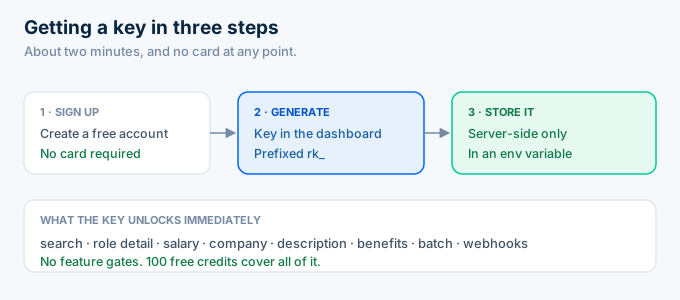
Sign up first. There is no sales call and no trial countdown, so you can take your time evaluating.
Then generate the key in the dashboard. Copy it once and put it somewhere safe, because a key is a credential, not a setting.
Store it server-side immediately. An environment variable is the right home for it, and your code reads it from there.
That is the whole setup. You now have a credential that reads Indeed postings.
What does an API key actually represent?
Your key is an identity and a wallet in one string. It tells the API who is calling, which plan you are on, how fast you may call, and which credit balance to draw from. It does not represent a user session, so there is nothing to refresh and no token to expire. The key works until you rotate or revoke it.
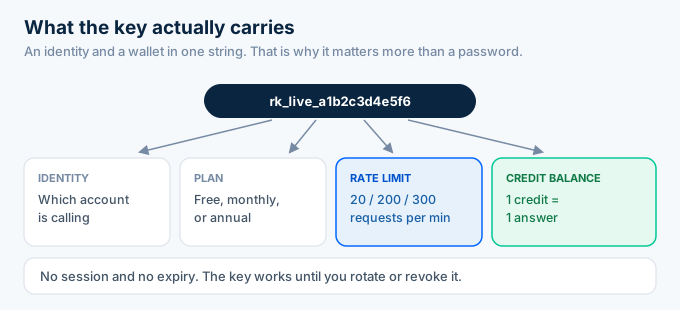
That combination is why the key matters more than a password.
A password lets someone into an account. A key lets someone spend your credits, from anywhere, with no login prompt.
Rate limits ride on the key too. On the free tier it allows 20 requests a minute, rising to 200 on the monthly plan and 300 on annual.
So one string carries your access, your speed, and your balance. Treat it accordingly.
Should you use one key or several?
Use one key per environment, at minimum. A local development key, a staging key, and a production key keep the blast radius small, because rotating one does not disturb the others. If you run several services, a key per service is better still, since you can trace usage and revoke precisely.
The reason is containment.
If your laptop key leaks, you rotate that one key. Nothing in production changes and no user notices.
With a single shared key, that same leak forces an emergency rotation everywhere at once, usually at a bad moment.
Separate keys also make usage legible. When one service starts burning credits unexpectedly, you can see which one it is instead of guessing.
Name your keys for where they run. A key labeled production-web is far easier to reason about six months later than one called key-2.
How do you make your first authenticated request?
You send the key as a bearer token in the Authorization header on every request over HTTPS. There is no OAuth redirect and nothing to sign for basic use. A valid key returns your data. A missing or wrong key returns a 401. The simplest first call is fetching one role by its job key.
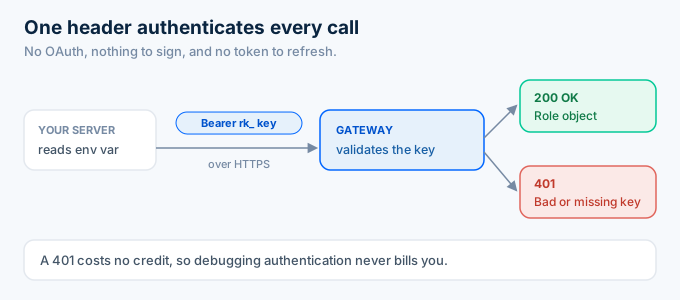
Here is that call with curl.
curl https://api.rolesapi.com/v1/roles/a1b2c3d4e5f6 \ -H "Authorization: Bearer rk_live_your_key"And the same thing in Python, reading the key from the environment.
import osimport requests
key = os.environ["ROLESAPI_KEY"]
r = requests.get(    "https://api.rolesapi.com/v1/roles/a1b2c3d4e5f6",    headers={"Authorization": f"Bearer {key}"},)role = r.json()["data"]
print(role["title"], role["company"])
If that prints a title and a company, your key works and you are done with setup.
Notice the key never appears in the code. It lives in ROLESAPI_KEY, which is what keeps it out of your repository.
Every endpoint uses this same header, so once this call works, the rest of the API is available to you. There is no second authentication step for search, batch, or webhooks.
That is worth pausing on. Most of the friction in API onboarding is auth, and here it is one header you set once.
What can you do with the key right away?
Your key unlocks every endpoint from the first request, with no tiered feature gates. You can search postings by keyword and location, fetch full role detail by job key, pull a single sub-resource like salary or company, and run an async batch job. The free 100 credits are enough to exercise all of it before you decide on a plan.
Search is the usual second call after your first role fetch.
curl -X POST https://api.rolesapi.com/v1/search \ -H "Authorization: Bearer rk_live_your_key" \ -H "Content-Type: application/json" \ -d '{"query": "data engineer", "location": "Austin, TX", "country": "us"}'That returns role summaries, each carrying a job key you can pass back to the detail endpoint.
From there the surface opens up. Sub-resource endpoints return just the salary or company block, and the batch endpoint enriches up to 500 keys in one async job.
None of it needs a different credential. The key you generated two minutes ago already reaches all of it.
Spend the free credits deliberately. Pull one role, run one narrow search, and count what comes back, because that number is the burn rate your monthly bill scales from.
How do you track what your key is using?
You track usage on the /v1/usage endpoint, which reports your credit balance and your plan limits for that key. Every response also carries headers with the credits a call used and how many remain, so you can meter spend without a second request. Watching both is how you avoid a surprise out-of-credits error mid-run.
curl https://api.rolesapi.com/v1/usage \ -H "Authorization: Bearer rk_live_your_key"Check it early, while you are still on the free tier.
One hundred credits disappear faster than people expect if your first search is broad. A query returning 50 roles costs 50 credits in a single call.
Read the credit header in your client and log it. A slow leak in credit usage is much easier to spot in logs than in a monthly total.
If you do run out, calls return a clear error rather than failing quietly, and you top up or upgrade from the dashboard.
How do you keep your Indeed API key secure?
You keep it secure by treating it as a credential. Store it in an environment variable on the server, never in front-end code or a git repository. Use a separate key per environment so a leaked local key cannot touch production. Rotate on a schedule, and revoke any key you suspect has leaked. A revoked key returns 401 on its very next request.
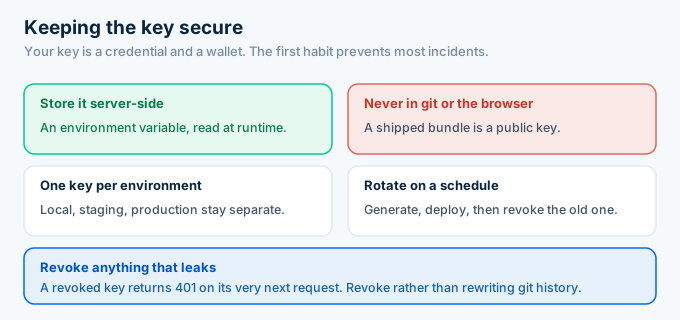
Front-end code is the most common mistake. Anyone can open a browser bundle and read what is inside it, so a key shipped to the client is a public key.
Separate keys per environment is the second habit worth building. If your laptop key leaks, you rotate it without a production deploy.
Rotation is painless. Generate a new key, deploy it, then revoke the old one. Requests using the old key start failing immediately, which is exactly what you want.
Never commit a key to git. If you already did, revoke it rather than deleting the commit, because the value is in the history and possibly in someone’s clone.
Add the key file to your ignore list before you write the key, not after. A .env entry in .gitignore costs nothing and prevents the most common leak.
If you share a config example with your team, share the variable name and leave the value blank. Nobody needs to see a live key to know one is required.
Why is your API key returning 401?
A 401 means the key is missing, malformed, or revoked. Check the header spelling first, since Authorization: Bearer rk_... needs the Bearer prefix and a single space. Then confirm you are using the right environment’s key and that it has not been rotated out. Failed auth costs no credit, so debugging a 401 does not bill you.
Work through it in order.
Confirm the header actually reached the request. A misconfigured HTTP client that drops custom headers looks identical to a bad key.
Then check the environment. Using the staging key against production is the most common false alarm, and it looks like a broken key when it is not.
Finally, confirm the key is still active. If someone rotated it, every service still holding the old value returns 401 until it is updated.
If the key is valid but you see a different error, read the status code. A 402 means you are out of credits, and a 429 means you hit the rate limit, which is 20 requests a minute on the free tier.
What are the common setup mistakes?
Most first-request failures come from four things: the key in the wrong place, the header slightly wrong, HTTPS not used, or the wrong environment’s key. None are subtle once you know them, and all of them look the same from the outside, which is a plain 401 with no detail about which mistake you made.
Hardcoding the key is the first. It works on your machine and then leaks the moment the repository is shared.
Header typos are the second. Authorisation, a missing Bearer, or a double space all fail, and they fail identically.
Plain HTTP is the third. Requests must use HTTPS, so an http:// base URL is refused before the key is even considered.
The fourth is copying a key with whitespace attached. A trailing newline from a copy and paste turns a valid key into an invalid one, and it is invisible in most editors.
When you are stuck, print the exact header your client is sending. The problem is usually visible in one line.
What happens when you outgrow the free key?
Nothing about the key changes. The same key keeps working when you move to a paid plan, so upgrading raises your credit balance and your rate limit without touching your code. You do not re-integrate, swap credentials, or change endpoints. The plan is a property of the account, not a different API.
That is worth knowing before you start.
Some providers gate features behind tiers, so the thing you prototyped is not the thing you ship. Here every endpoint is available on the free tier.
Upgrading is a billing action. Your integration keeps running through it.
If you later want separate billing or tracing per service, generate more keys on the same account rather than opening new accounts.
Frequently asked questions
How do I get an Indeed API key?
Indeed no longer issues public API keys, because it retired its developer program. You get a working key from a third-party Indeed API instead. With RolesAPI you create an account, open the dashboard, and generate a key that starts with rk_. The free tier gives you 100 credits with no card required.
Does Indeed still give out API keys in 2026?
No. The Publisher and Job Search API programs are closed to new developers, so there is no signup form that produces a working Indeed key. What remains is employer and ATS partner access. To read Indeed postings programmatically, you use a third-party job-data API key.
Is there a free Indeed API key?
Effectively yes, through a free tier. RolesAPI gives every new account 100 credits with no card, and that key works on every endpoint including search, role detail, salary, and batch. It is enough to build and test a full integration before you decide whether to pay anything.
How do I use an Indeed API key in a request?
Send it as a bearer token in the Authorization header on every request over HTTPS. The header looks like Authorization: Bearer rk_live_your_key. There is no OAuth flow and nothing to sign for basic use. A valid key returns your data, and a missing or wrong key returns a 401.
How do I keep my API key secure?
Store it server-side in an environment variable, never in front-end code or a git repository. Use a separate key for each environment so a leaked local key does not touch production. Rotate keys on a schedule, and revoke any key you suspect has leaked. Revoked keys start returning 401 immediately.
Why is my Indeed API key returning 401?
A 401 means the key is missing, malformed, or revoked. Check that the Authorization header is spelled correctly with the Bearer prefix, that you are using the right environment’s key, and that the key has not been rotated out. A 401 costs no credit, so failed auth attempts do not bill you.
Get your key and make the call
Stop hunting for a program that closed years ago. The key you actually need takes about two minutes to create.
Sign up for a free RolesAPI account, generate a key, put it in an environment variable, and run the curl command above. If it prints a job title, you are connected.
That single successful call is the milestone worth chasing. Everything after it is product work rather than setup, because the same header carries you through every other endpoint.
You get 100 credits and no card, which is enough to wire a real integration end to end. For what to build next, read the complete Indeed API guide, the endpoint documentation, or the guide to pulling listings into your app.